
Add an online order without retyping it.
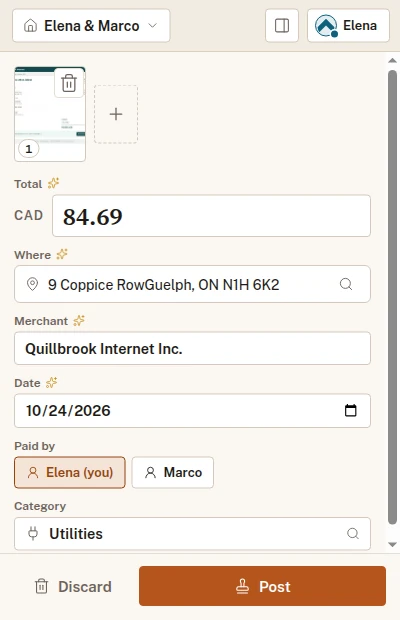
Press the extension on the page with the invoice, and it reads the merchant, the date and the total. It lands in the Ledger as an entry for you to check before it is posted.
Coming soon
Chrome, Edge and Firefox. Free on every plan.

Hand it over the way it arrived.
Screenshot
Drag a box over the part that matters, or take the whole page. A page longer than the screen can keep going past the edge.
Upload
Send the PDF open in the tab, or pick any file.
Type it
Fill in the form yourself when there is nothing to read.
Check what it read, choose the household, the category and who paid, then send it. It opens as a popup, or in Chrome’s side panel if you want it to stay open while you move between tabs.
It sees nothing until you press it.
A press gives it the tab you are on, and only that tab. It sends only what you chose to send, to your account. The side panel asks for wider access only if you switch to it, because it stays open as you change tabs.
Free on every plan, with any account.
Reading a page or a PDF takes one scan, the same as a photo, so on Free it comes out of the scans you keep in hand. Typing an expense in takes none.
Start with an account.
Make a household on the web, then sign in once from the extension. It adds to the same ledger as everything else.
Coming soon
